
This page is one Video Prompt from the PromptPix app — Build Height Identity. Image Prompt (still) and Video Prompt (motion) stay on this card. No other video is mixed in.
This card asks the model to keep an uploaded face or reference. Leave those lock lines in on the first generate.
Copy Image Prompt for a still, or Copy on the Video Prompt for motion. Then open Flow, Gemini, or ChatGPT and paste. The site does not auto-paste.
Build Height Identity
Video Prompt
build and height. Keep identity exactly same as reference photo — no alteration to face, body, or hairstyle in any scene.

Keep the person's body proportions natural and realistic, matching the exact build shown in the reference photo — do not add extra muscle, height, or bulk. Any user's own body type should reflect naturally in the movement style.

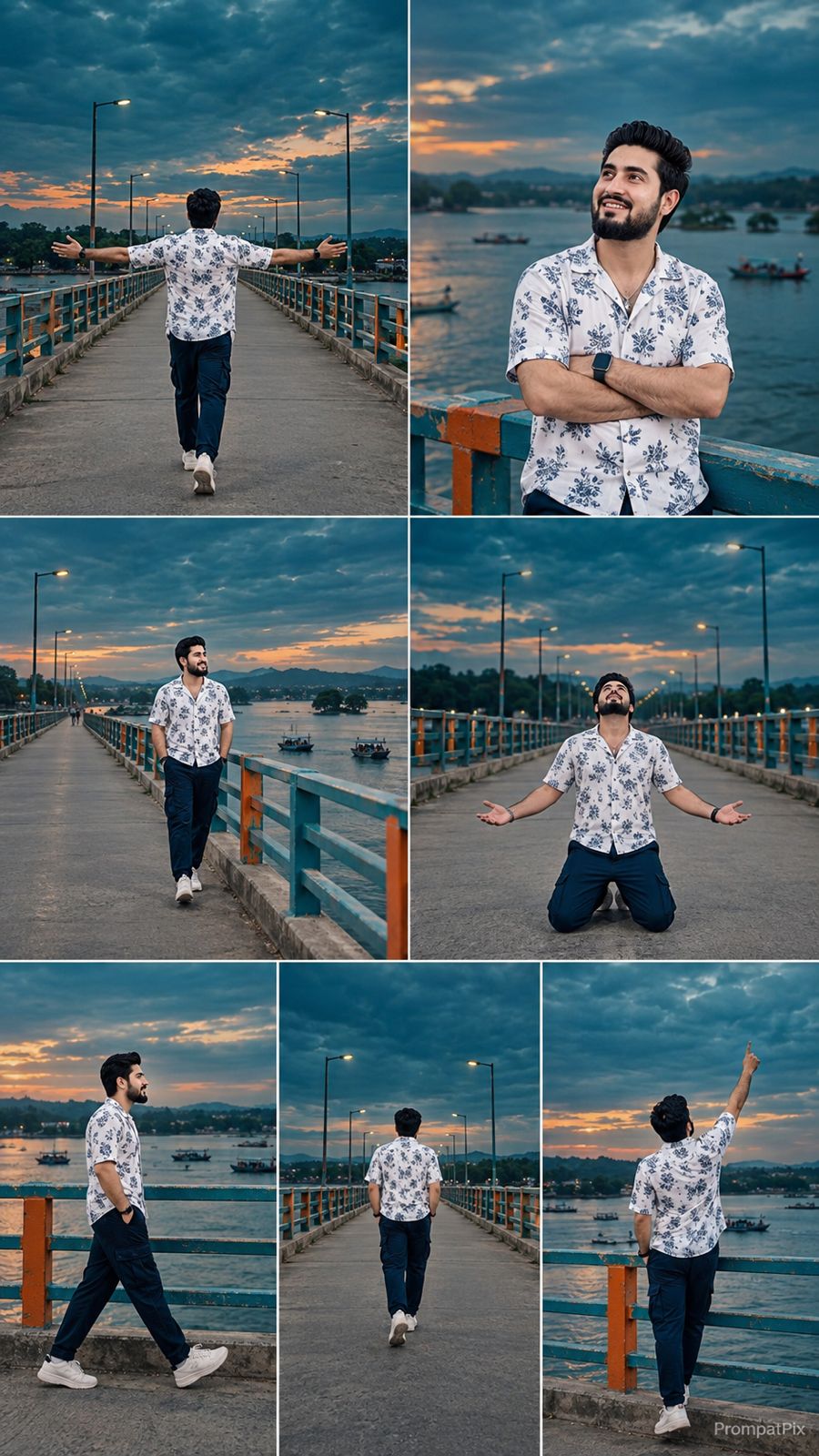
Outfit (same throughout, do not change): white floral-printed short-sleeve shirt, dark navy pants, white sneakers.

Location (same throughout all 7 scenes, do not change): a long concrete bridge stretching over a wide river, metal railing painted in teal-and-orange stripes along both sides, distant green tree line, small islands and boats visible on the water, dramatic overcast dusk sky — evening light, not nighttime.

Color grade: dramatic cinematic deep-teal color grade covering the entire sky and water, moody atmospheric evening tone, consistent across all scenes.

Create 7 cinematic scenes, same outfit and same bridge location throughout, matching this exact sequence:

Scene 1 (same bridge location): Wide shot from behind, man walking away from the camera down the center of the bridge, both arms spread out wide to the sides in a free, carefree gesture, steady walking pace, small figure against the vast teal sky and water.

Scene 2 (same bridge location): Medium shot, man standing at the railing, arms crossed over his chest, looking up at the sky with a calm reflective expression, water and distant shoreline behind him.

Scene 3 (same bridge location): Wide shot, man walking along the bridge at a distance, calm and steady pace, teal-orange railing and water stretching beside him, boats visible on the water.

Scene 4 (same bridge location): Front-facing wide shot, man dropping down and kneeling in the middle of the bridge, head tilted upward, dramatic emotional pose, empty road stretching behind him.

Scene 5 (same bridge location): Side profile wide shot, man walking past the camera along the railing, calm steady motion, water and horizon in the background.

Scene 6 (same bridge location): Back view wide shot, man walking away from the camera down the bridge, natural walking motion, dramatic wide teal sky above him, street lamps lining the path.

Scene 7 (same bridge location): Wide shot, man standing at the railing, raising one arm upward as if reaching toward the sky, dramatic emotional finishing pose, water and distant land visible behind him.

Format: 9:16 vertical, 1080p resolution, cinematic pacing with smooth camera movement throughout, same location and deep-teal color grade maintained from Scene 1 to Scene 7.

Watermark: small semi-transparent text "PrompatPix" in the bottom-right corner, visible consistently across all 7 scenes.
FAQ
What is this video prompt?
Yes — one card: Build Height Identity. Same as tapping that video in the PromptPix app.
Should I upload a reference photo?
Yes if the text says to match a face or scene. Add the photo in Flow or Gemini, then paste this prompt without deleting the match lines.
Image Prompt vs Video Prompt on this card?
Image Prompt is for a still in Gemini or ChatGPT. Video Prompt is for motion in Flow or Gemini video. Copy only the block you need.
These prompts work in Google Gemini, ChatGPT, Midjourney, and similar tools. For Image to Prompt from your own photo, use the PromptPix app.





