
This page is one Video Prompt from the PromptPix app — Man's Hairstyle Skin. Image Prompt (still) and Video Prompt (motion) stay on this card. No other video is mixed in.
This card asks the model to keep an uploaded face or reference. Leave those lock lines in on the first generate.
Copy Image Prompt for a still, or Copy on the Video Prompt for motion. Then open Flow, Gemini, or ChatGPT and paste. The site does not auto-paste.
Man's Hairstyle Skin
Video Prompt
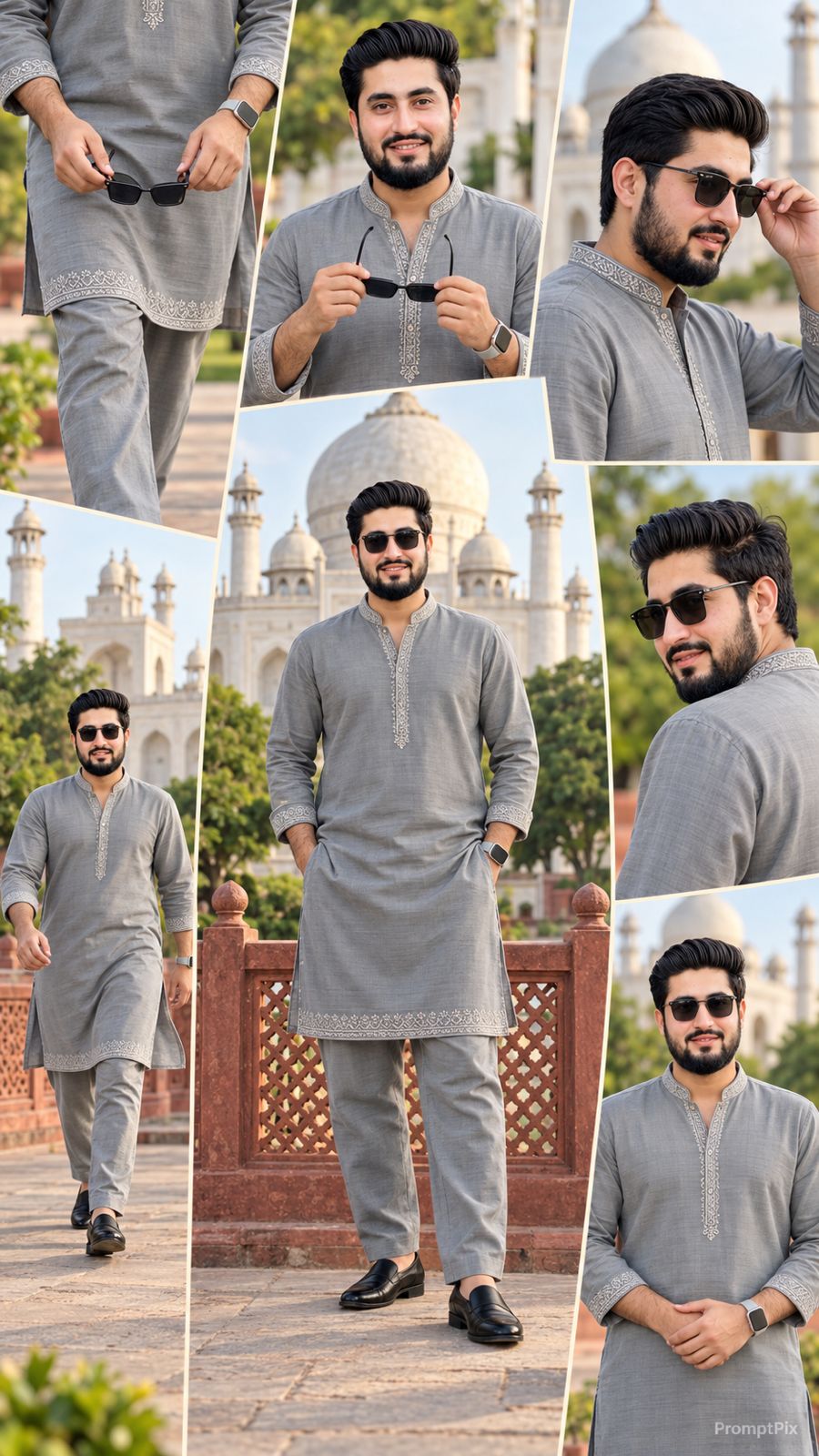
Use the uploaded reference photo for the man's face, hairstyle, skin tone, body build and height. Keep identity exactly same as reference photo — no alteration to face, body, or hairstyle in any scene. Keep his skin natural, clean, and clear exactly as shown in the reference photo — no added blemishes, spots, or texture flaws. Keep the person's body proportions natural and realistic, matching the exact build shown in the reference photo — do not add extra muscle, height, or bulk. This must work accurately for any person of any age or body type who uploads their own reference photo — the generated face, skin, and body must always match the uploaded photo exactly, never a generic or different look. Outfit (same throughout, do not change): a grey kurta-pajama set with a mandarin collar, delicate silver embroidery along the collar and the hem border, relaxed straight-fit pajama pants in matching grey, black formal slip-on shoes, holding a pair of sunglasses. Location (same throughout all 7 scenes, do not change): an outdoor heritage monument courtyard with tall white domed structures and ornate stone archways in the background, a red sandstone railing with carved lattice (jaali) pattern in the foreground, green trees, soft natural daylight. Color grade: rich, natural, vibrant cinematic color grading — true-to-life skin tones and fabric colors, soft daylight contrast, sharp realistic detail, not faded or desaturated, consistent across every scene. Create 7 cinematic scenes, same outfit and same monument location throughout: Scene 1: Close-up shot of the man's hands holding his sunglasses at waist level while walking, grey kurta with silver embroidered hem visible, blurred green garden path behind him. Scene 2: Medium close-up shot, walking toward the camera, sunglasses held in both hands near his chest, silver embroidered collar visible, white boundary wall and greenery blurred behind him. Scene 3: Close-up side profile shot, man putting on his sunglasses with one hand, calm composed expression, white domed monument softly blurred in the background. Scene 4: Full body front shot, man standing confidently facing the camera, sunglasses on, white domed monument and red sandstone jaali railing clearly visible behind him. Scene 5: Close-up back-angle shot, man looking over his shoulder toward the camera, sunglasses on, green trees blurred in the background. Scene 6: Full body walking shot, man walking confidently toward the camera near the red sandstone railing, white monument domes and minarets framing him in the background. Scene 7: Medium shot, man standing calm and composed, sunglasses on, soft natural daylight, monument and greenery forming a balanced cinematic backdrop behind him. Format: 9:16 vertical, 1080p resolution, smooth cinematic pacing with natural camera movement throughout, same location and color grade maintained from Scene 1 to Scene 7. Watermark: small semi-transparent text "PromptPix" in the bottom-right corner, visible consistently across all 7 scenes.
FAQ
What is this video prompt?
Yes — one card: Man's Hairstyle Skin. Same as tapping that video in the PromptPix app.
Should I upload a reference photo?
Yes if the text says to match a face or scene. Add the photo in Flow or Gemini, then paste this prompt without deleting the match lines.
Image Prompt vs Video Prompt on this card?
Image Prompt is for a still in Gemini or ChatGPT. Video Prompt is for motion in Flow or Gemini video. Copy only the block you need.
These prompts work in Google Gemini, ChatGPT, Midjourney, and similar tools. For Image to Prompt from your own photo, use the PromptPix app.





