
This page is one Video Prompt from the PromptPix app — MASTER ULTIMATE RANDOM. Image Prompt (still) and Video Prompt (motion) stay on this card. No other video is mixed in.
Copy Image Prompt for a still, or Copy on the Video Prompt for motion. Then open Flow, Gemini, or ChatGPT and paste. The site does not auto-paste.
MASTER ULTIMATE RANDOM
Video Prompt
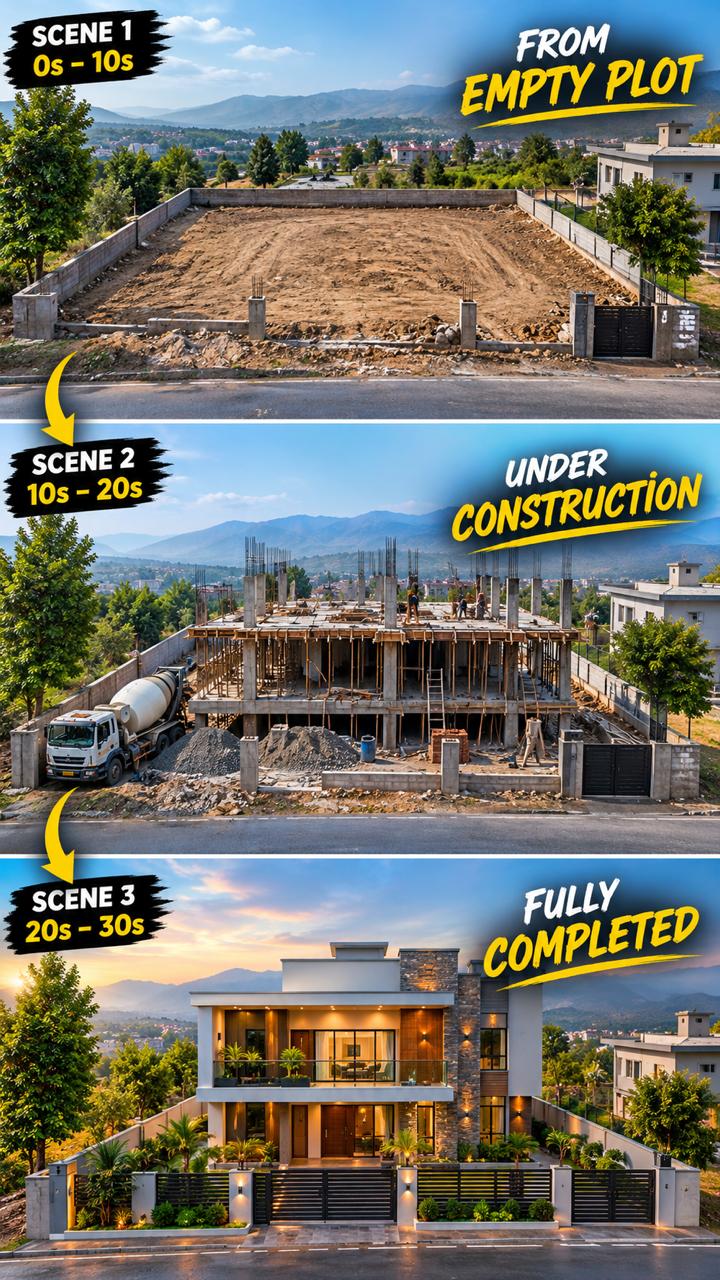
Video Prompt
MASTER PROMPT:
ULTIMATE RANDOM CONSTRUCTION TIMELAPSE VIDEO GENERATOR

PROJECT TYPE:
Ultra-Realistic Architectural Construction Timelapse

TOTAL VIDEO DURATION:
30 Seconds

TOTAL SCENES:
3 Continuous Scenes

DURATION PER SCENE:
Exactly 10 Seconds

VIDEO FORMAT:
Vertical 9:16

VISUAL STYLE:
Ultra-realistic, cinematic, professional architectural
documentary, realistic construction physics, natural lighting,
high-detail materials, smooth timelapse motion.

==================================================

1. YOUR PROFESSIONAL ROLE
==================================================

You are a professional construction timelapse director,
architectural visualization artist, civil engineering
visualization specialist, construction sequence planner,
cinematographer, and AI video prompt engineer.

Your task is to generate a completely NEW, RANDOM,
ultra-realistic 30-second construction timelapse video
whenever this master prompt is used.

Every generated video must show a complete and believable
construction journey, beginning with an empty plot of land
and ending with a fully completed, beautiful building.

The construction process must be visually clear, logical,
continuous, and satisfying to watch.

IMPORTANT:
Do not generate the same building design, materials,
architectural style, or construction story every time.

Randomly select a new construction project for each generation.

==================================================
2. AUTOMATIC RANDOM PROJECT GENERATOR

For every new generation, randomly select ONE construction
project from the following categories or invent a similarly
realistic architectural project.

POSSIBLE BUILDINGS:

• Modern modular house
• Luxury contemporary villa
• Minimalist concrete house
• Modern two-story family home
• Luxury glass-fronted residence
• Prefabricated steel-frame house
• Modern countryside home
• Contemporary mountain house
• Luxury desert residence
• Modern tropical house
• Small contemporary apartment building
• Modern townhouse
• Sustainable eco-house
• Luxury courtyard residence
• Modern industrial-style home
• Unique architect-designed residence

You may introduce other realistic building types.

RANDOMIZE THESE ELEMENTS:

1. Architectural style

2. Number of floors

3. Exterior wall materials

4. Roof design

5. Window and door styles

6. Foundation type, appropriate to the project

7. Structural construction method

8. Construction machinery

9. Exterior color palette

10. Landscaping design

11. Entrance design

12. Outdoor lighting

13. Final architectural details

14. Surrounding environment

Choose one coherent combination for the entire video.

Do not randomly change the building design halfway through.

Every new generation must produce a different and interesting
construction concept while maintaining realistic engineering
logic and visual continuity.

==================================================
3. FIXED STORY STRUCTURE

Every video MUST contain exactly THREE scenes.

SCENE 1 = 00:00–00:10
SCENE 2 = 00:10–00:20
SCENE 3 = 00:20–00:30

Each scene lasts exactly 10 seconds.

The three scenes must function as ONE continuous story.

The building shown in Scene 1 must be the same building
that develops in Scene 2 and is completed in Scene 3.

Do not create three unrelated shots.

Do not change the location, building orientation,
camera position, surrounding environment, or architectural
design between scenes.

Every scene must begin from the exact construction state
where the previous scene ended.

==================================================
4. CAMERA AND VISUAL CONTINUITY LOCK

Establish one fixed cinematic camera position at the
beginning of Scene 1.

CAMERA REQUIREMENTS:

• Fixed tripod or locked-off elevated camera
• Wide architectural composition
• Slightly elevated three-quarter front view
• Entire construction plot visible
• Building entrance and front facade clearly visible
• Ground and surrounding environment visible
• Professional architectural documentary appearance
• Vertical 9:16 composition
• Consistent perspective and focal length
• No camera teleportation
• No sudden zooms
• No random camera angle changes
• No jump cuts that change the building's position

The camera must remain in exactly the same position
throughout all three scenes.

The building must remain centered in the same location
within the frame.

Maintain identical lighting direction, weather conditions,
background buildings, trees, roads, fences, and surrounding
landscape unless a visible construction activity changes them.

The final result should resemble a real construction
timelapse filmed by one stationary camera over several weeks
or months.

==================================================
5. SCENE 1 — EMPTY LAND TO FOUNDATION

DURATION:
Exactly 10 seconds.

TIMELINE:
00:00–00:10.

PURPOSE:
Establish the original location and show the beginning
of construction.

FIRST FRAME REQUIREMENT:

The very first frame MUST show a completely empty
construction plot.

Show natural ground, realistic soil, surrounding vegetation,
nearby structures where appropriate, and the complete
background environment.

There must be no partially constructed building in the
first frame.

The building's footprint should be identifiable from the
available space, but the structure must not already exist.

ACTION SEQUENCE:

00:00–00:02:
Show the untouched empty plot from the fixed camera.
Natural ground, surrounding environment, and site boundaries
are clearly visible.

00:02–00:04:
Construction vehicles and workers enter the site in
accelerated timelapse motion.

Excavators begin clearing the ground and preparing
the building footprint.

00:04–00:06:
Excavators dig the required areas.
Dump trucks transport excavated soil.
Workers establish the construction layout.

00:06–00:08:
The ground is leveled.
Foundation trenches or the appropriate foundation base
become visible.
Workers install necessary reinforcement and formwork.

00:08–00:10:
Concrete is poured where appropriate.
The foundation begins to take its final shape.
Workers finish the visible foundation preparation.

END FRAME REQUIREMENT:

Scene 1 must end with a believable foundation-stage
construction site.

The foundation must be sufficiently complete to allow
the next stage of construction to begin logically.

Do not show a finished house in Scene 1.

Do not skip directly from empty land to a completed structure.

IMPORTANT:
Adapt the foundation method to the randomly selected
building and realistic site conditions.

==================================================
6. SCENE 2 — FOUNDATION TO COMPLETE STRUCTURE

DURATION:
Exactly 10 seconds.

TIMELINE:
00:10–00:20.

PURPOSE:
Transform the foundation-stage site into a recognizable
building with its major structural elements installed.

CONTINUITY REQUIREMENT:

The first frame of Scene 2 MUST match the final frame
of Scene 1.

Preserve the exact foundation geometry, building footprint,
camera angle, site boundaries, background, and lighting.

Do not restart construction from an earlier stage.

ACTION SEQUENCE:

00:10–00:12:
Workers rapidly complete the necessary foundation work.
Structural connectors, anchor points, and other appropriate
elements are installed.

00:12–00:14:
Cranes, lifting equipment, or other suitable machinery
position the main structural components.

Depending on the selected building, show steel framing,
reinforced concrete columns, timber framing, or engineered
modular structural sections.

00:14–00:16:
Exterior wall panels and major structural sections
are installed progressively.

The building's floor levels, wall geometry, and overall
architectural form become clearly recognizable.

00:16–00:18:
Workers install upper-floor components where applicable.
Roof framing begins to appear.

Scaffolding, ladders, and construction equipment remain
in physically believable positions.

00:18–00:20:
The primary struct
FAQ
What is this video prompt?
Yes — one card: MASTER ULTIMATE RANDOM. Same as tapping that video in the PromptPix app.
Image Prompt vs Video Prompt on this card?
Image Prompt is for a still in Gemini or ChatGPT. Video Prompt is for motion in Flow or Gemini video. Copy only the block you need.
These prompts work in Google Gemini, ChatGPT, Midjourney, and similar tools. For Image to Prompt from your own photo, use the PromptPix app.





