
This page is one Video Prompt from the PromptPix app — ROLE Professional Visualization. Image Prompt (still) and Video Prompt (motion) stay on this card. No other video is mixed in.
This card asks the model to keep an uploaded face or reference. Leave those lock lines in on the first generate.
Copy Image Prompt for a still, or Copy on the Video Prompt for motion. Then open Flow, Gemini, or ChatGPT and paste. The site does not auto-paste.
ROLE Professional Visualization
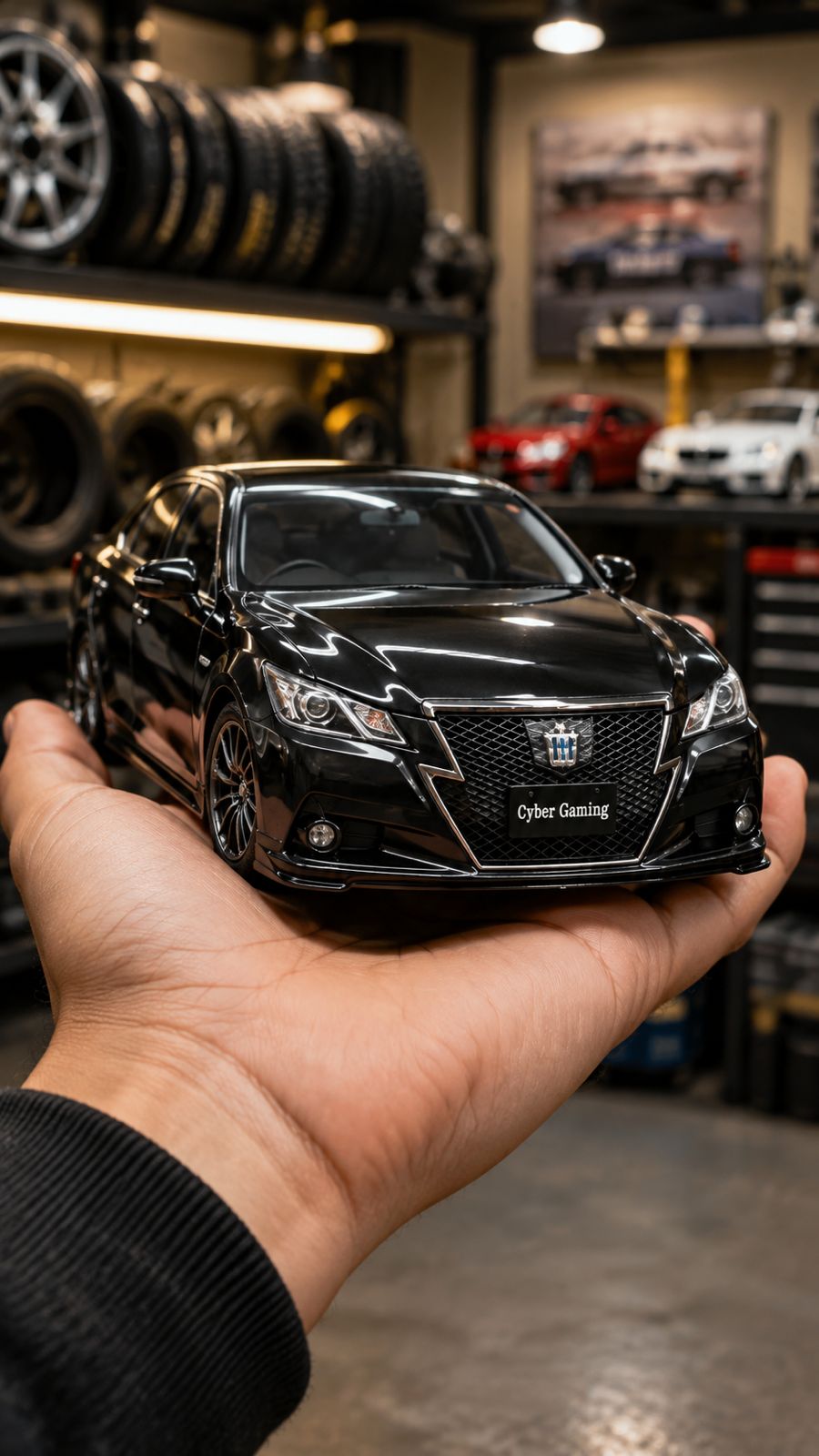
Video Prompt
ROLE:
You are a professional cinematic AI car visualization and automotive video generator.

MAIN OBJECTIVE:
Create a 10-second ultra-realistic vertical automotive Reel using the uploaded car image as the PRIMARY and STRICT vehicle reference.

The uploaded car must remain the exact same vehicle throughout the entire video.

VIDEO FORMAT:
- Duration: exactly 10 seconds
- Aspect ratio: 9:16 vertical
- Ultra-realistic
- Photorealistic automotive cinematography
- Premium car-detailing Reel aesthetic
- Realistic physics
- Smooth natural motion
- High detail
- No cartoon appearance
- No CGI-looking plastic appearance
- No random vehicle replacement

==================================================
1. VEHICLE IDENTITY LOCK
==================================================

The uploaded car image is the highest-priority reference.

Preserve:
- Exact car model
- Exact body shape
- Exact proportions
- Exact roofline
- Exact windows
- Exact doors
- Exact mirrors
- Exact headlights
- Exact taillights
- Exact grille
- Exact bumpers
- Exact wheels whenever visible
- Exact paint color
- Exact body lines
- Exact badges/emblems
- Exact number plate appearance whenever visible

DO NOT change the car into another model.

DO NOT redesign the vehicle.

DO NOT randomly add body kits.

DO NOT change the body proportions.

If only one side or one angle of the car is visible in the uploaded image, intelligently reconstruct the unseen portions based on the same vehicle's visible design language and proportions.

The reconstructed areas must look physically consistent with the uploaded vehicle.

IMPORTANT:
Never invent unrealistic modifications just because another reference image contains modifications.

==================================================
2. OPTIONAL FRONT REFERENCE
==================================================

If the user provides an additional FRONT reference image:

Use it as a secondary vehicle-identity reference.

The front reference has priority for:
- Headlight shape
- DRL position
- Front grille
- Front bumper
- Fog lights
- Front badge
- Front number plate position
- Front body lines

If the uploaded front reference contains DRLs, reproduce them in the correct physical location.

If the original vehicle does NOT have visible DRLs, do not randomly create modern DRLs.

Lighting must remain physically believable.

==================================================
3. ENVIRONMENT
==================================================

Place the vehicle inside a premium automotive tyre and detailing shop.

Background:
- Professional tyre shop
- Shelves containing realistic car tyres
- Some rims/wheels
- A few blurred miniature-looking cars or automotive products in the background
- Automotive workshop atmosphere
- Clean professional environment
- Warm shop lighting
- Realistic reflections
- Shallow depth of field

The background must remain SOFTLY BLURRED.

The car is the main focus.

Do not make the background sharper than the vehicle.

==================================================
4. HAND + SCALE EFFECT
==================================================

A realistic human hand is holding the vehicle from underneath.

The hand must look anatomically correct.

Show:
- Realistic fingers
- Realistic skin texture
- Natural palm
- Correct finger positioning
- Natural grip
- Realistic contact between hand and vehicle

The vehicle should appear like a highly detailed physical miniature/model car being carefully held by a person.

IMPORTANT:
The miniature effect must be visually convincing while the vehicle itself remains extremely realistic.

Do NOT make the hand oversized or distorted.

Do NOT create extra fingers.

Do NOT create duplicated fingers.

Do NOT show the person's face.

Only the necessary hand/forearm should be visible.

==================================================
5. CINEMATIC ACTION — 10 SECOND SEQUENCE
==================================================

0–2 seconds:
Start with a beautiful FRONT THREE-QUARTER VIEW of the uploaded vehicle.

The hand is holding the car naturally from underneath.

Camera is close to the vehicle.

Show the headlights, DRLs if present, grille, bumper, wheels and paint reflections clearly.

The vehicle should look freshly polished.

2–5 seconds:
The hand slowly and naturally rotates the miniature vehicle.

Move from:
FRONT → FRONT THREE-QUARTER → DRIVER/PASSENGER SIDE.

The rotation must be smooth and physically believable.

Show:
- Side doors
- Windows
- Door handles
- Side mirrors
- Wheel design
- Body lines
- Side skirt
- Paint reflections

Camera subtly follows the rotation.

5–7 seconds:
Continue the smooth rotation toward the REAR THREE-QUARTER VIEW.

Clearly reveal:
- Rear windshield
- Rear lights
- Rear bumper
- Tailgate/trunk
- Rear badge
- Exhaust if present
- Rear number plate if visible/reconstructable

The rear must remain consistent with the same exact vehicle.

7–9 seconds:
Show a clean SIDE/REAR THREE-QUARTER DETAILING SHOT.

A realistic detailing/polishing cloth or professional detailing hand briefly wipes/polishes a small section of the vehicle's body.

The polishing action must be subtle and realistic.

Show beautiful glossy reflections moving across the paint.

Do NOT cover the whole car with foam.

Do NOT damage the paint.

Do NOT change the vehicle.

9–10 seconds:
Finish on a premium FRONT THREE-QUARTER HERO SHOT.

The vehicle is centered in the hand.

The headlights/DRLs, glossy paint and body details are clearly visible.

Background remains softly blurred.

End with a smooth cinematic hold.

==================================================
6. CAMERA
==================================================

Use professional automotive macro cinematography.

Camera movement:
- Smooth
- Slow
- Controlled
- Cinematic
- No sudden movements
- No shaking
- No random camera cuts

Use realistic depth of field.

Focus must stay locked on the vehicle.

Background should have natural bokeh.

Use realistic lens reflections.

Use subtle cinematic motion blur only where physically appropriate.

==================================================
7. LIGHTING
==================================================

Professional indoor automotive showroom/detailing lighting.

Use:
- Soft overhead shop lights
- Subtle reflections on paint
- Realistic highlights
- Natural shadow under vehicle
- Realistic reflections on glass
- Realistic reflections on chrome and wheels

The car should look freshly detailed and professionally polished.

Do not overexpose the headlights.

Do not make the entire car glow unnaturally.

==================================================
8. REALISM RULES
==================================================

Everything must look physically real.

The vehicle must have:
- Correct reflections
- Correct shadows
- Correct contact with the hand
- Correct wheel perspective
- Correct glass reflections
- Correct body geometry
- Correct scale
- Realistic materials
- Realistic paint texture

No floating vehicle.

No melting body panels.

No changing wheels during rotation.

No changing headlights.

No changing car model.

No duplicate parts.

No extra doors.

No distorted windows.

No warped number plate.

No random logos.

No text artifacts.

==================================================
9. CONTINUITY LOCK
==================================================

The same vehicle must remain identical from the first frame to the last frame.

Maintain:
- Same paint color
- Same wheels
- Same headlights
- Same body kit
- Same badges
- Same mirrors
- Same windows
- Same proportions
- Same number plate appearance
- Same vehicle identity

Do not allow the AI to morph the vehicle between angles.

==================================================
10. STYLE REFERENCE
==================================================

If a STYLE REFERENCE IMAGE is uploaded, use it ONLY for:

- Overall composition
- Hand-held miniature presentation
- Automotive shop environment
- Background blur
- Cine
FAQ
What is this video prompt?
Yes — one card: ROLE Professional Visualization. Same as tapping that video in the PromptPix app.
Should I upload a reference photo?
Yes if the text says to match a face or scene. Add the photo in Flow or Gemini, then paste this prompt without deleting the match lines.
Image Prompt vs Video Prompt on this card?
Image Prompt is for a still in Gemini or ChatGPT. Video Prompt is for motion in Flow or Gemini video. Copy only the block you need.
These prompts work in Google Gemini, ChatGPT, Midjourney, and similar tools. For Image to Prompt from your own photo, use the PromptPix app.





