
This page is one Video Prompt from the PromptPix app — Vertical Ultra-realistic Male. Image Prompt (still) and Video Prompt (motion) stay on this card. No other video is mixed in.
This card asks the model to keep an uploaded face or reference. Leave those lock lines in on the first generate.
Copy Image Prompt for a still, or Copy on the Video Prompt for motion. Then open Flow, Gemini, or ChatGPT and paste. The site does not auto-paste.
Vertical Ultra-realistic Male
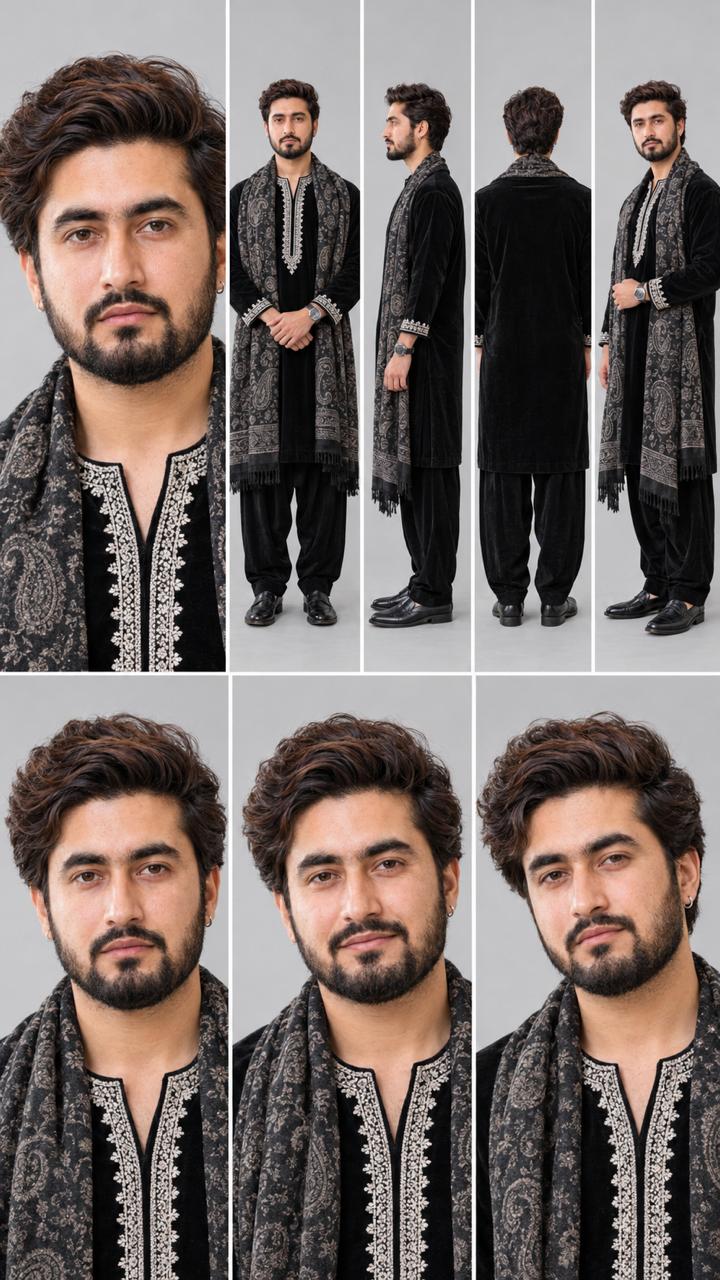
Image Prompt
Create a professional character reference sheet of the SAME handsome young Indian man in one image, 16:9 landscape, plain light grey studio background, soft even lighting, photorealistic, sharp face, natural skin texture, 4K.

Layout (grid with thin white dividers):
Top row, 5 panels: (1) large close-up face portrait, (2) full body front view, (3) full body side view, (4) full body back view, (5) full body three-quarter view.
Bottom row, 3 panels: close-up face portraits with different natural expressions (neutral, soft smile, slight smirk).

Character: medium-length wavy dark brown hair with slight auburn tone, light stubble beard, wheatish skin, slim build, silver hoop earring in left ear.

Outfit (identical in every panel): black velvet kurta with white chikankari embroidery on the neck placket and cuffs, black pajama trousers, black paisley Kashmiri shawl with grey and silver pattern draped over both shoulders, black leather shoes, wristwatch.

Face, hair, outfit and proportions must stay perfectly consistent across all panels.
Video Prompt
Cinematic 9:16 vertical 8K ultra-realistic male model video on an open terrace under soft daylight.

[IDENTITY & FACE LOCK]
Use the uploaded reference photo for the man's face, hairstyle, skin tone, body build and height. Keep identity exactly same as reference photo — no alteration to face, body, or hairstyle in any scene. Strictly lock 100% facial features, jawline, and skin tone from the uploaded reference photo. Clean, smooth, blemish-free skin with natural DSLR texture, zero face morphing across all shots. This must work accurately for any person of any age or body type who uploads their own reference photo — whether short, tall, slim, or heavy — the generated face and body must always match the uploaded photo exactly, never a generic or different look.

[OUTFIT & STYLING]
Jet-black kurta pajama with heavy white threadwork around the neckline and cuffs, a draped grey Kashmiri paisley shawl over the shoulders, black formal shoes, silver-framed round sunglasses. Same outfit throughout, no changes.

Location (same throughout, do not change): an open terrace under soft daylight.

[EXACT SCENE SEQUENCE]
- Scene 1: Low-angle tracking shot of his black shoes walking forward across the terrace floor.
- Scene 2: Torso shot — walking forward, shawl draped around his shoulders, white embroidered collar visible.
- Scene 3: Back-view medium shot — standing at the terrace edge, hands held behind his back, looking at the sky.
- Scene 4: Macro close-up — on the shawl fabric and embroidered kurta cuff as his hand adjusts the shawl.
- Scene 5: Waist-up shot from the front — resting his hands together in front of him.
- Scene 6: Medium profile — turning to the side, hand resting on the shawl over his chest.
- Scene 7: Full-body slow-motion walk — forward with hands behind his back, wearing sunglasses.
- Scene 8: Medium close-up tracking shot — walking forward in sunglasses, confident gaze.
- Scene 9: Close-up portrait — looks at the camera and does a smooth hand-wave gesture forward.

[COLOR & TECHNICAL]
Cool soft daylight tone, high-contrast black-and-white fabric details, sharp 8K DSLR optics, 9:16 vertical ratio.

[WATERMARK]
Clean, subtle white text watermark promptpix  in the bottom corner, low opacity, present throughout the video.
FAQ
What is this video prompt?
Yes — one card: Vertical Ultra-realistic Male. Same as tapping that video in the PromptPix app.
Should I upload a reference photo?
Yes if the text says to match a face or scene. Add the photo in Flow or Gemini, then paste this prompt without deleting the match lines.
Image Prompt vs Video Prompt on this card?
Image Prompt is for a still in Gemini or ChatGPT. Video Prompt is for motion in Flow or Gemini video. Copy only the block you need.
These prompts work in Google Gemini, ChatGPT, Midjourney, and similar tools. For Image to Prompt from your own photo, use the PromptPix app.





